Power Injection for Permanent LED Lights
Power injection keeps permanent LED lights bright and color-accurate across long roofline runs. This guide explains when power injection is needed, what voltage drop looks like, how power and data should be separated, and how to plan cleaner wiring for a reliable Bright Home Lights installation.
What Is Power Injection?
Power injection is the practice of feeding new low-voltage power into a permanent LED light run after the first section of lights has already consumed some of the available voltage. Each puck or pixel uses a small amount of power. As the run gets longer, the remaining voltage drops and the lights at the end of the line have less power available than the lights near the controller.
That voltage drop is most visible when the lights are set to bright white or high-output colors. Dimmer accent effects may look fine, while white, warm white, red, or full-bright holiday effects may expose weak power delivery. A good power injection plan keeps voltage more consistent so the whole roofline behaves like one clean system.
When Do Permanent LED Lights Need Power Injection?
You should plan for power injection when a run is long enough that the end of the line no longer receives stable voltage. The exact distance depends on LED voltage, brightness, cable gauge, connection quality, number of lights, and the effects being used. A system may work during low-brightness testing and still need injection once the homeowner uses brighter presets.
Common signs include:
- The last lights in a run look dimmer than the first lights.
- White looks yellow, pink, or inconsistent near the end of the line.
- Lights flicker when bright effects are selected.
- Colors change correctly near the controller but not at the far end.
- Long roofline sections behave differently from shorter sections.
| Symptom | Likely cause | SEO-friendly installation answer |
|---|---|---|
| End of run is dim | Voltage drop | Add power injection after the section where voltage begins to fall. |
| White shifts color | Not enough voltage under load | Inject positive and negative power with the correct gauge cable. |
| Effects flicker | Weak power, poor splice, or excessive run length | Check connections, reduce run length, or add a new injection point. |
| Colors do not follow correctly | Data issue, not only power | Verify data direction, data output, and controller segment configuration. |
Power Injection Connection Examples
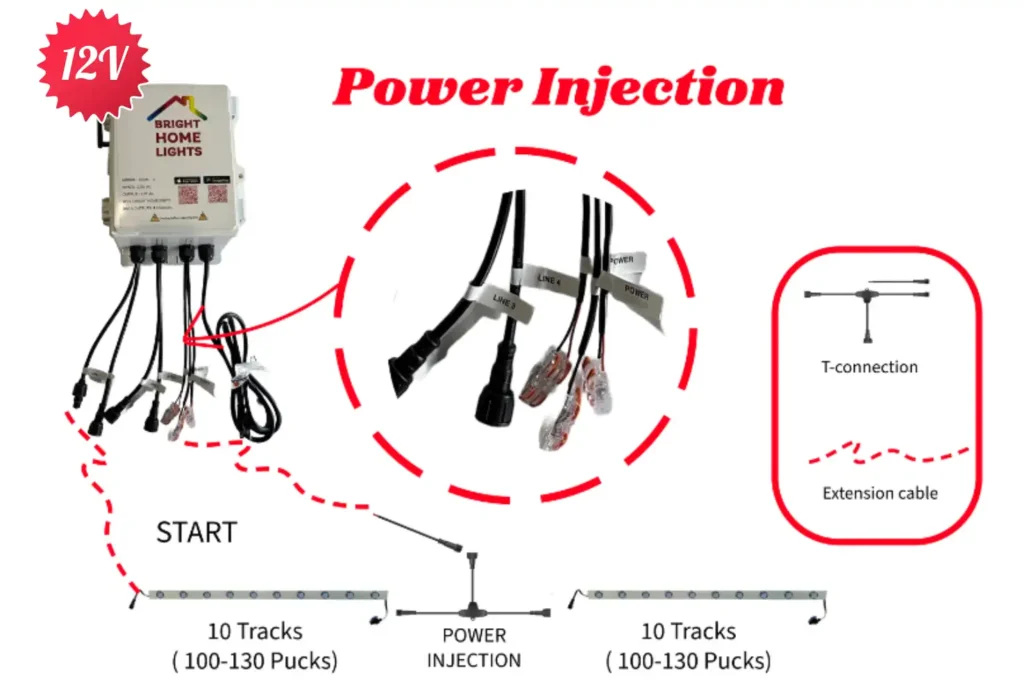
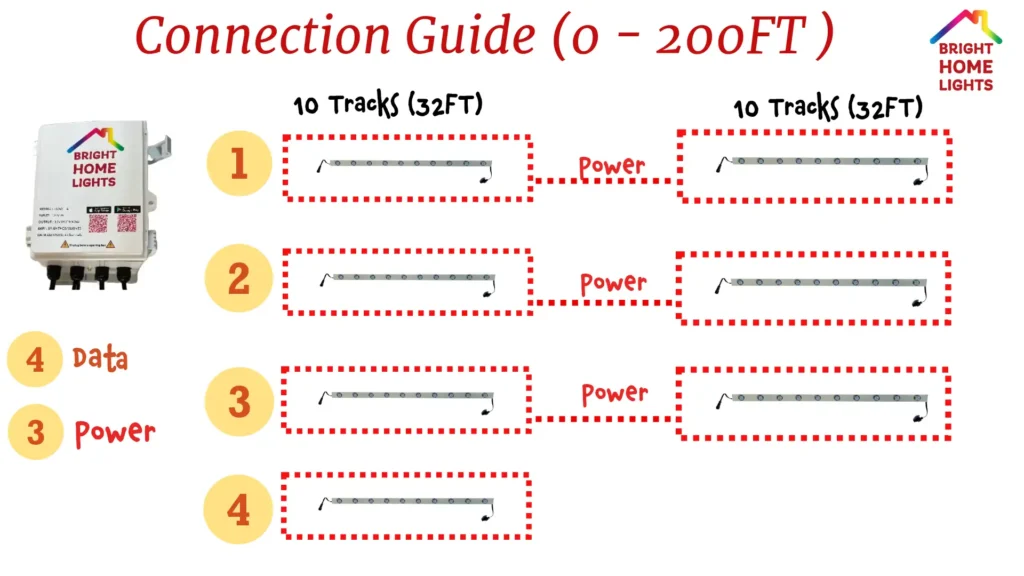
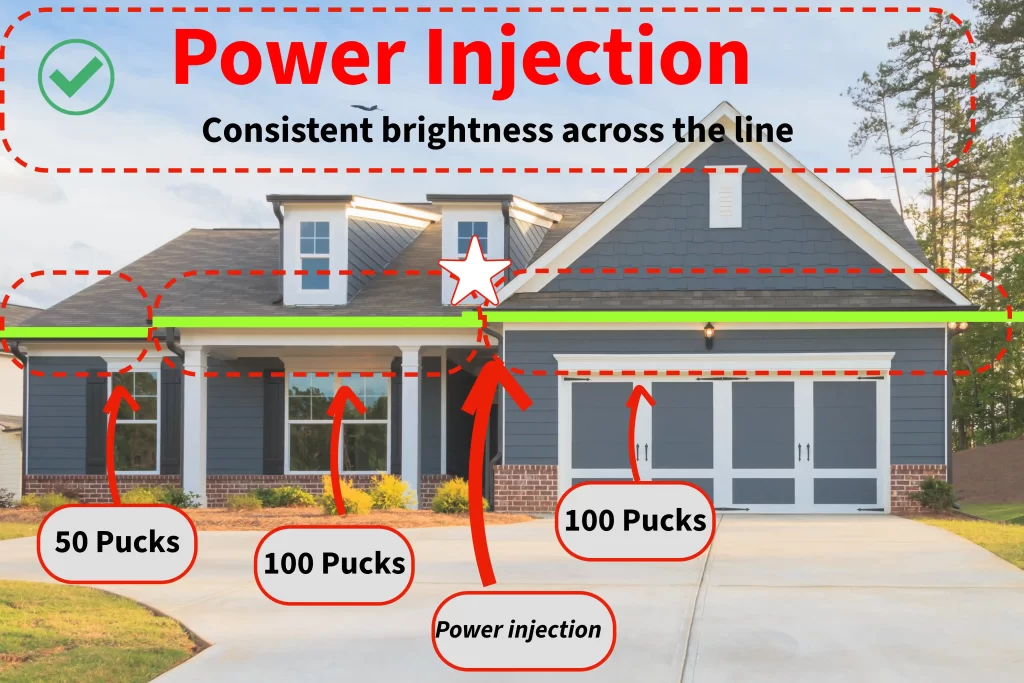
A permanent lighting controller may use several data outputs and several power injection outputs. In the example below, the system uses multiple data points as the start of separate lines, while power is injected after longer sections. This prevents one roofline run from being forced to carry all of the power from the controller to the last light.
Power Injection vs Data Injection
Power injection and data wiring solve different problems. Power injection sends new positive and negative power to the lights. Data wiring tells each LED what color and effect to display. If the lights are dim or color-shifted, power is usually the first thing to check. If the lights are bright but the pattern is wrong, the data path or segment settings may be the issue.
Why Voltage Drop Happens
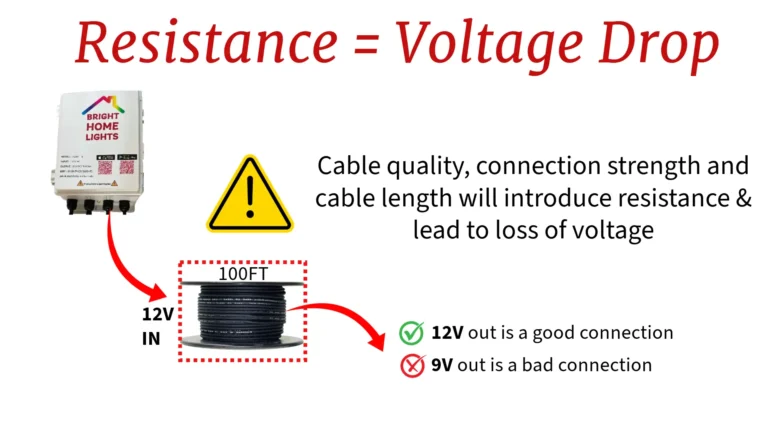
Voltage drop happens because every wire, connector, and LED adds resistance. The longer the cable and the more LEDs in the run, the more resistance the system has to overcome. Lower-quality cable, thin wire, long home runs, and poor connections make the problem worse.
For permanent roofline lights, voltage drop is not only a brightness issue. It can also affect color accuracy. Red, green, blue, and white do not all show symptoms the same way, so a run can appear acceptable in one preset and fail in another.
With Power Injection vs Without Power Injection
A properly injected run keeps brightness consistent across the roofline. A run without enough power can appear dim or uneven, especially at the far end of the line. For customer-facing installations, this difference matters because homeowners notice inconsistent roofline brightness from the street.

Cable Wiring for Power Injection
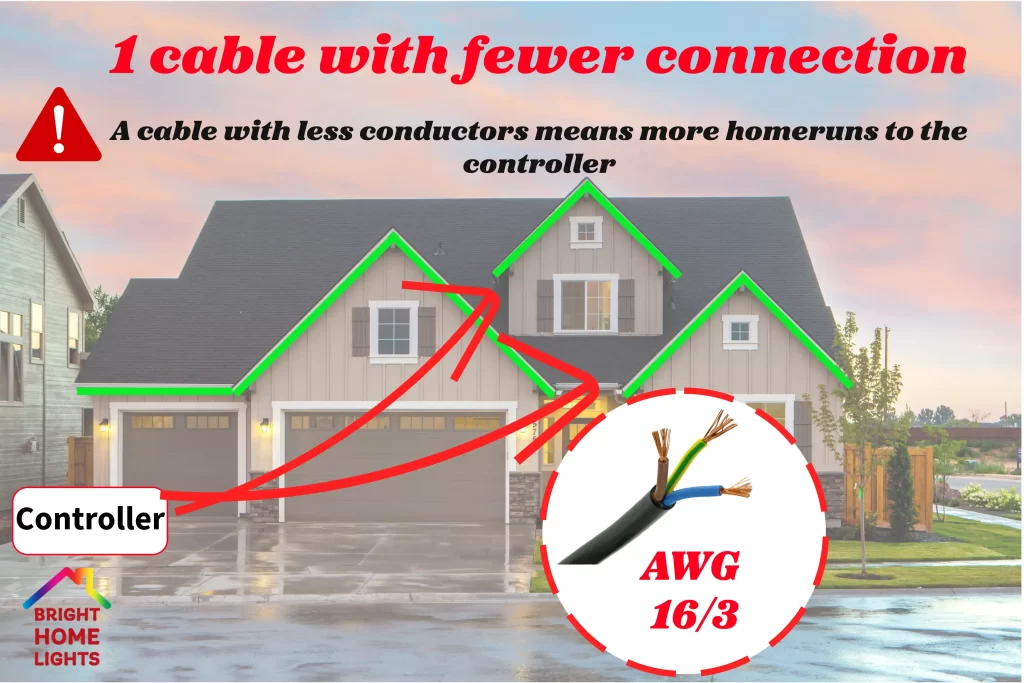
Use cable with enough conductors and the correct gauge for the distance, load, and installation plan. For longer distances, 16 AWG cable is often a better choice than thinner wire because it reduces resistance and helps deliver more stable voltage. Cable quality, splice quality, and weather protection are just as important as the wiring diagram.
For installation planning, review the permanent lighting installation tools and wiring recommendations, the permanent lights installation guide, and the LED count and segment setup guide.

Common Power Injection Mistakes
- Waiting too long to inject power: Adding injection only at the very end may not help the middle of a long run.
- Confusing power problems with data problems: Dim lights usually point to power; incorrect patterns may point to data or segment settings.
- Using wire that is too thin: Thin wire increases resistance and makes voltage drop worse.
- Leaving connections exposed: Outdoor splices need proper weather protection.
- Testing only low-brightness effects: Always test bright white and full-bright presets before finishing.
Power Injection FAQ
How do I know if I need power injection?
You likely need power injection if the end of a permanent LED light run is dim, flickers, or shows the wrong color when bright effects are used.
Can I inject power without injecting data?
Yes. Power injection adds fresh positive and negative power. Data can continue from the previous light when the data signal is still reliable.
Does power injection fix every color problem?
No. Power injection fixes voltage drop and weak power delivery. If lights are bright but the effect is wrong, check the data direction, controller output, and segment settings.
What wire gauge should I use for permanent LED power injection?
Wire gauge depends on distance and load, but 16 AWG cable is commonly used for longer low-voltage permanent lighting runs because it reduces resistance compared with thinner cable.
Should power injection be planned before installation?
Yes. Planning injection points before mounting the lights keeps the install cleaner and reduces the need for extra home runs after testing.
Need Help Planning a Run?
Use the measurement guide before ordering, then match the run layout with the LED count and segment guide. For system setup after installation, review the Bright Home presets guide.